

Description
Offline English-Chinese Dictionary for Browser
Overview
The software is a desktop-compatible browser extension designed to deliver instant, offline translations of English words and phrases into Chinese. It operates entirely without reliance on external online translation services, making it ideal for users who prioritize privacy, speed, and consistent access to language data. The tool is particularly useful for language learners, writers, and professionals working with multilingual content across Windows, Mac, and Linux systems.
By embedding a curated dictionary dataset—derived from the open-source ECDICT project and optimized for size and performance—the extension ensures accurate and reliable results. All dictionary data is stored locally within the plugin, eliminating dependency on network connectivity. This feature is especially beneficial in low-bandwidth environments or for users concerned about data privacy. The tool supports both automatic word selection and manual input via a built-in query field, allowing flexible usage across various workflows.
With version 0.0.7, the extension introduces morphological analysis, displaying inflected forms such as past tense, past participle, and third-person singular for queried words like "get." This enhancement improves linguistic accuracy and supports deeper understanding of English grammar. The developer, program-in-chinese, has maintained a transparent release history with clear changelogs, indicating active development and user-focused improvements.
Key Features & Capabilities
- Offline Translation – No internet required. All dictionary data is embedded within the plugin, ensuring privacy and consistent performance.
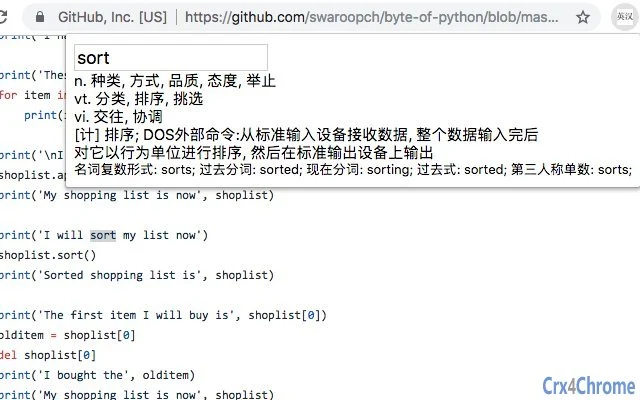
- Instant Popup Translation – Select any English word or phrase in a webpage; a pop-up window instantly displays the corresponding Chinese translation.
- Manual Query Input – Includes a built-in input field to manually enter words or phrases when selection is not possible, supporting flexible usage.
- Smart Case Handling – If a lowercase query fails, the tool automatically attempts a lookup with uppercase variants (e.g., "ok" → "OK").
- Morphological Analysis – Version 0.0.7 adds detailed grammatical forms: past tense, past participle, present participle, third-person singular (e.g., "get" → "got", "getting", "gets").
- Whitespace Trimming – Automatically removes leading and trailing spaces from selected text before querying to prevent failed lookups.
- Batch Query Interface – Provides a programmable API for other extensions to perform bulk lookups, enabling integration into larger toolchains.
These features make the tool highly effective for real-world scenarios such as reading technical documents, studying academic texts, or translating content during travel. The inclusion of morphological data supports language learning by showing how words change across tenses and forms, enhancing comprehension beyond simple definitions.
User Interface, Workflow & Performance
The user interface is minimal and context-aware, designed to integrate seamlessly into browser workflows. When a user selects text on a webpage, a small pop-up appears with the translation, maintaining visual clarity without disrupting the reading experience. The design prioritizes speed and usability, with no unnecessary elements or complex menus.
Navigating the tool is intuitive: simply highlight text and wait for the pop-up, or use the input field for manual queries. The workflow remains consistent across different browsers and operating systems, ensuring a uniform experience on Windows, Mac, and Linux. The tool does not require user authentication, setup steps, or configuration, making it accessible even to non-technical users.
Performance is optimized for speed after initial load. During installation, the full dictionary data is loaded into memory, which takes a few seconds—approximately two seconds in internal testing. After this, every query is processed instantly, as the data remains in memory. The developer did not specify resource usage details, but based on general software behavior, the tool maintains low CPU and RAM overhead during active use. Stability appears robust, with no reported crashes or freezes in the release notes.
Compatibility & System Requirements
The software is compatible with Windows, Mac, and Linux operating systems, supporting a broad range of desktop environments. It functions as a browser extension, meaning it integrates with major browsers such as Chrome, Firefox, and Edge, though specific browser compatibility was not detailed in the provided information.
The installation file size is 13+MB, reflecting the inclusion of a comprehensive dictionary dataset. This size is expected due to the embedded nature of the data. The developer did not provide additional system requirements, including minimum RAM, processor, or disk space. Exact performance details were not specified, but the tool’s reliance on in-memory loading suggests it will perform best on systems with sufficient RAM to accommodate the dataset.
Platform compatibility information is limited to the listed operating systems. No mention was made of support for mobile platforms or specific browser versions. Users should ensure their system meets general requirements for running modern browsers.
Pros and Cons
Pros
- 100% offline operation – no internet or third-party services required
- Fast lookup after initial load – no delay during repeated use
- Supports morphological analysis for improved language learning
- Manual input option for non-selectable text
- Transparent and open-source data source (ECDICT)
- Lightweight interface with minimal system impact after startup
Cons
- Large installation size (13+MB) due to embedded dictionary
- Initial load time may be noticeable on slower systems
- No official support for mobile browsers or platforms
- System requirements not clearly defined
- Only supports English-Chinese translation
FAQ Section
Is this tool free to use?
Yes, the software is completely free. There are no hidden fees or subscription models.
Does it require an internet connection?
No. The tool operates entirely offline. All dictionary data is stored locally within the plugin, so no internet access is needed for translations.
Can I use this on Mac, Windows, and Linux?
Yes, the software is compatible with Windows, Mac, and Linux operating systems.
How often does it update?
Updates are released as needed. The developer maintains a public changelog, with version 0.0.7 released on June 25, 2024. Users are encouraged to check for updates regularly.
Is the dictionary data secure?
Yes. Since all data is embedded locally and no external services are used, the tool ensures data privacy. No user queries are sent over the internet.
Final Thoughts
This offline English-Chinese dictionary tool stands out as a reliable, privacy-focused utility for anyone working with language translation on desktop systems. Its ability to deliver instant, accurate translations without relying on online services makes it a valuable asset for students, professionals, and language enthusiasts. The inclusion of morphological information in version 0.0.7 adds significant educational value, supporting deeper understanding of English grammar.
While the initial load time and file size are notable considerations, they are justified by the comprehensive dataset and full offline functionality. The clean interface, intuitive workflow, and cross-platform support further enhance its appeal. For users seeking a secure, fast, and self-contained translation solution, this tool delivers on its core promise.
Download Offline English-Chinese Dictionary for Browser now.
Guides & Tutorials for 离线英汉词典 Extension for Chrome
How to install 离线英汉词典 Extension for Chrome
- Click the Preview / Download button above.
- Once redirected, accept the terms and click Install.
- Wait for the 离线英汉词典 Extension for Chrome download to finish on your device.
How to use 离线英汉词典 Extension for Chrome
This software is primarily used for its core features described above. Open the app after installation to explore its capabilities.
User Reviews for 离线英汉词典 Extension for Chrome 0
No reviews found





